Short answer
Make the vault's own backup on the old phone first, because a normal phone transfer will not carry a vault for you. On iPhone, app files can travel in a backup, but a key marked this-device-only cannot be used on new hardware, so the files arrive and will not open. On Android, Auto Backup stops at 25 MB per app, and Google's copy tool skips hidden folders and apps that do not use Android backup. Use the vault's own route: a backup file in AlterVault, Private Cloud in Keepsafe, Cloud Vault or a computer backup in Private Photo Vault. Check every item on the new phone before you wipe the old one.
On this page
Phone transfer vs AlterVault's backup file
What a normal phone move does for a vault, and what one backup file does instead.
 AlterVault
Why vault photos do not come across
The details differ by platform, and the iPhone case is the one that fools people.
- On iPhone: the files come, the key does not
- Apple's backups include app data, so a vault's encrypted files can arrive on the new phone. But a Keychain item marked this-device-only is protected with that device's hardware identity, so it is useless on any other device. A vault built properly uses exactly that setting, so you get a full container with nothing to open it.
- On Android: mostly nothing comes
- Cloud Auto Backup stops at 25 MB per app, which a photo vault passes almost at once. Google's copy tool skips photos, videos and music in hidden folders, and data from apps that do not use Android backup. So a folder-hiding vault loses its files, and an app's private files copy only if its developer opted in.
- Android keys stay behind too
- Android Keystore is designed to prevent extraction: key material stays non-exportable and can be bound to secure hardware. If it could be copied to a new phone, an attacker could copy it too. That is the design working, not a bug.
- Android to iPhone, and back
- Apple's Move to iOS carries contacts, messages, photos, files and some settings, plus some free apps that exist on both stores. Google's copy tool from iPhone works much the same way. Neither carries a vault's contents or its key.
- Why it looks like the app failed
- The app opens, the code does not work, or the grid is empty. People conclude the vault deleted their photos, then uninstall it to try again. That is when the last chance often goes.
Sources: Apple: What does iCloud back up?, Apple Platform Security: Keychain data protection, Android Developers: Auto Backup for Apps, Android Help: Copy apps and data to a new Android device, Android Developers: Android Keystore system, Apple: Move from Android to iPhone or iPad
Before you do anything
Five minutes on the old phone, while it still works.
- Do not erase or trade in the old phone yet
Keep it until the new one has been checked item by item. Google gives the same advice for its own transfers: clear the old phone only after confirming everything copied.
- Find out which kind of vault you have
Cloud vault, built-in folder, or on-device vault. The section further down lists the route for each.
- Write down every code
The vault code, album codes and any cloud password. A password that lives only in your memory is the one you forget during a stressful move.
- Count what you have
Note the item count in each album or space. You need a number to compare against, because a partial restore looks normal.
- Check that your backup finished
Open the vault's backup or cloud screen and confirm it is complete, not just switched on.
Sources: Android Help: Copy apps and data to a new Android device
Move AlterVault: on the old phone
One encrypted file, per space, while the old phone still works.
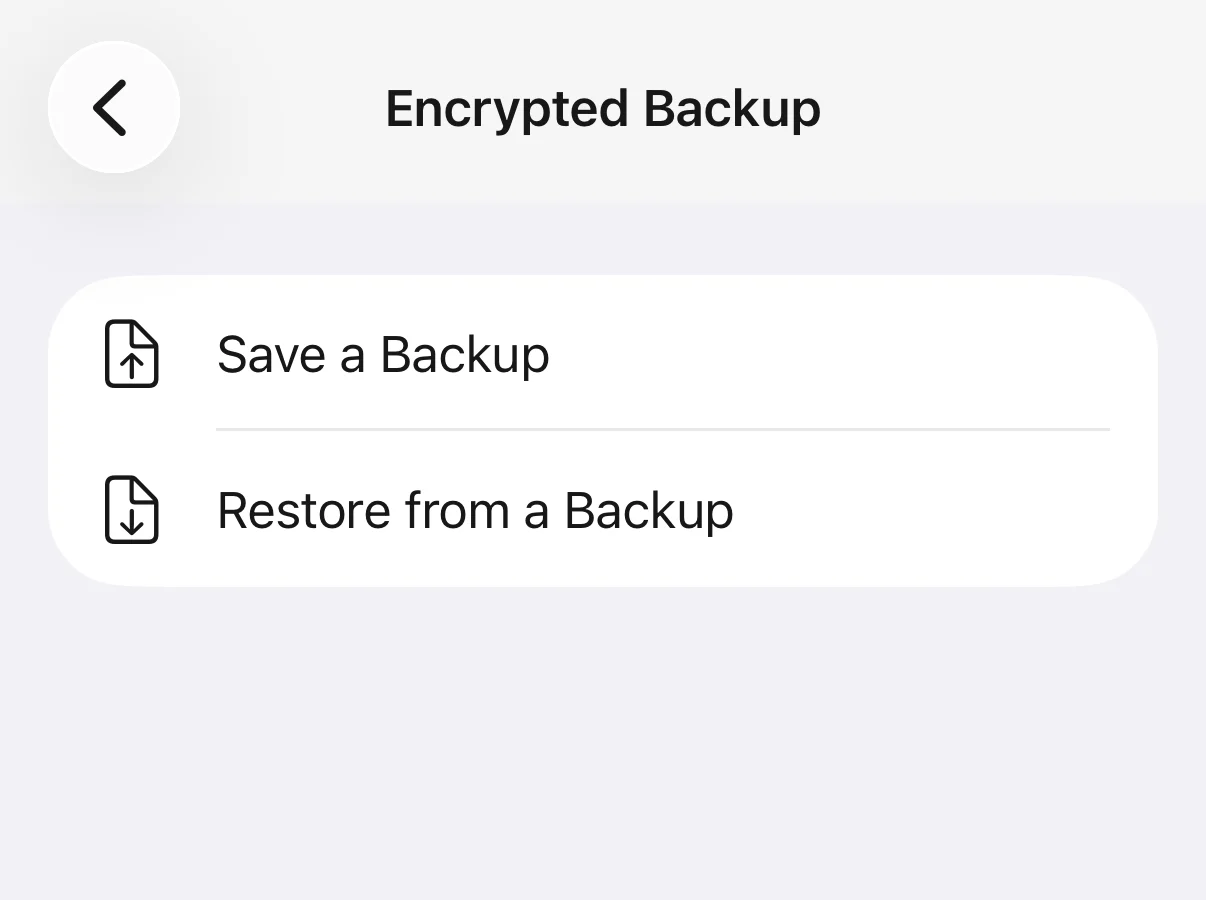
- Save a backup
Open the space, then Settings, Encrypted Backup, Save a Backup. Enter your code. The app writes one encrypted file, named AlterVault with the date and ending in .vault.
- Put the file somewhere else
The share sheet lets you send it to a computer, a drive, a cloud folder or the new phone. Expect it to be about the size of the vault, because it is your encrypted files copied as they are. Nothing is decrypted to build it.
- Repeat for each space
Several vaults behind several codes means several files. Note which code sealed which file. The decoy gallery has no backup and does not need one.
Move AlterVault: on the new phone
The order matters here. Restore is reached from Settings, so you set the app up first.
- Install and start setup
Choose the same code type you used before, digits or emoji. The code itself can be temporary, because the backup's code replaces it. A different type makes the restore stop and ask you to erase the vault first.
- Tap Do this later at the recovery phrase
Do not create a phrase yet. A phrase belongs to one vault's key, and the restore replaces that key. You will make the real one in step 6.
- Restore the file
Settings, Encrypted Backup, Restore from a Backup. Pick the file, then enter the code the backup was made with, not the one you just set.
- Confirm the replacement
The app warns that everything in this space will be replaced. On a new phone there is nothing to lose. If a restore stops partway, the space still opens, so restore the same file again to finish.
- Count, then restore your purchase
Compare the count with your note. If items past the first 10 look blurred, tap Restore purchases on the upgrade screen. Nothing has been deleted, and the blur clears once the store confirms what you own.
- Make a new recovery phrase
Settings shows a red notice that no recovery phrase is saved. Follow it and write the new phrase down. The old phone's phrase does not work on this phone.
- Now you can clear the old phone
Keep the backup file for a while. It remains a valid way back in.
Things that catch people out
- The code travels with the file
- After a restore, the space opens with the backup's code. To change it, use Settings, Change Code.
- Restore replaces, it does not merge
- Restoring overwrites the space you are standing in. For a second file, restore your purchase first, since extra spaces are a Pro feature. Then use Add a Space in Settings, open the new space with its code, and restore into it.
- A recovery phrase is not a backup
- The 12 words answer a forgotten code on the phone they were made on. They are not on any server, so they cannot rebuild a vault on a new phone. Only the backup file does that.
- An iCloud restore can bring the files back without the key
- The app then says the items are encrypted with a key that is no longer on this device. Restoring your backup file is the way back in. Without that file, the phone transfer has not saved anything.
- "That code already opens a space on this phone"
- A restored code has to be unique on the phone. If you used that code for a different space, change that space's code, then restore again.
- Purchases belong to the store
- Restore purchases works on any phone signed in to the same store account. AlterVault has no account of its own to carry a purchase from Google Play to the App Store, so changing platform means buying again. Your backup file still restores without paying.
- A short code is a weak file
- A file that leaves the phone can be attacked offline, with no five-try limit. Use a long code. The file's header shows that it is an AlterVault backup, when it was made and whether the code is digits or emoji, though not what it contains.
How to move every other kind of vault
 Keepsafe
- Install on the new phone and log in to the same account, with cloud backup on for both phones under Settings, Backup & Sync. Keep the app open with the screen on until everything syncs. Basic only backs up 200 items and Premium 10,000, so anything beyond that has to be exported to your gallery, moved, and imported again.
 Private Photo Vault
- The company recommends Cloud Vault, which is Premium: finish the backup and sign in on the new phone. On iPhone, a computer backup through Finder or Apple Devices works too. It warns that some customers have had problems restoring through iCloud device backups.
 Google Photos Locked Folder
- Turn on its backup and it follows your Google account. Or move items out, transfer them, and move them back. With backup off, they stay on the old phone and are lost when it is reset.
- Samsung Secure Folder
- Samsung has withdrawn Secure Folder backup. Moving to another Samsung means Smart Switch with a cable, with Secure Folder unlocked on the old phone. Moving to a Pixel or iPhone means moving everything out by hand first.
- iPhone Hidden album
- It is part of your Photos library, so it moves with iCloud Photos or a full phone transfer. Check Albums, then Hidden, on the new phone. To leave Apple, unhide the photos first and treat them like any other export.
- Calculator and other small vaults
- Assume nothing will transfer. Look for an export or backup option in the app's settings and test it with a few photos. If there is none, export everything to your gallery, move it, import it, and clear the plain copies.
Sources: Keepsafe Help: How do I transfer photos to a new phone?, Private Photo Vault: FAQ, Google Photos Help: Locked Folder, Samsung: Cannot backup Secure Folder
If the vault is already empty on the new phone
Stop first. Most recoveries are lost by reinstalling and resetting in a panic.
- Do not uninstall the app
- Uninstalling deletes anything the app holds on that phone, including encrypted files that may yet be useful.
- Go back to the old phone
- If it has not been reset, the vault is still on it. Open the app there and make a backup, or export. This is why the old phone stays untouched until the end.
- Look for a backup you forgot
- Search your drive, computer and files for a .vault file. For a cloud vault, sign in and check the cloud allowance.
- If the code will not work after a restore
- Use the code the backup was made with. Old codes from other phones and the temporary setup code will not open a restored space.
- If there is no backup and the old phone is gone
- For any vault with a key only you hold, the photos cannot be recovered, by us or anyone else. That is the cost of a key that exists nowhere else, and the reason for doing the backup before you need it.
Questions
Why did my photo vault not transfer to my new phone?
Because a phone transfer is not built to carry one. On iPhone, app files can copy, but a key marked this-device-only cannot be used on new hardware. On Android, Auto Backup stops at 25 MB per app and Google's copy tool skips hidden folders. The vault's own backup has to be made before the old phone is wiped.
Does iCloud back up vault apps?
Apple's backups include app data, so a vault's encrypted files usually go along. Whether they open afterward depends on the key. If it is stored as this-device-only, the files arrive unusable on a new phone. Some apps opt out of backup entirely, and Private Photo Vault warns of problems with iCloud device backups.
Does Smart Switch transfer vault apps?
Smart Switch can move Samsung's own Secure Folder from Samsung to Samsung over a cable, with the folder unlocked. For third-party vault apps, treat it like any other transfer: the app may arrive, but do not count on its contents or key. Make the app's own backup first.
How do I move an AlterVault library to a new phone?
On the old phone: Settings, Encrypted Backup, Save a Backup, then keep the file off the phone. On the new phone: install, use the same code type, skip the recovery phrase, then Settings, Encrypted Backup, Restore from a Backup with the backup's code. Finally, restore your purchase and make a new recovery phrase.
Can I move a vault from Android to iPhone, or iPhone to Android?
Not with Apple's or Google's switching tools. It needs the vault's own route. AlterVault's backup file restores on either platform, so you can send it between them, though a purchase does not carry across stores. Keepsafe syncs through its account, and Private Photo Vault's Cloud Vault works on both.
Is it safe to store the backup file in the cloud?
Yes, it is sealed with a key from your code, so the provider cannot read it. A file someone can take away can be attacked offline with no attempt limit, so use a long code. The header reveals that it is an AlterVault backup, its date and whether the code is digits or emoji, but not its contents.
Can I recover my vault photos without a backup?
From a cloud vault, sign in and check what was backed up. From an on-device vault, only if the old phone still exists and has not been reset. If the key came from your code on a phone that has been wiped, nobody can recover the photos, including us.
Does my AlterVault recovery phrase work on a new phone?
No. The phrase answers a forgotten code on the phone it was made on, and its record stays on that device. Only the backup file carries a vault to a new phone, and it opens with the code it was made with. Make a new phrase on the new phone after the restore.
Does uninstalling a vault app delete my photos?
Usually, for anything stored only in the app. AlterVault's photos live inside the app's own storage, and Private Photo Vault says the same of its local files. Save a backup before uninstalling for any reason, including troubleshooting.